
Open tools, 04.2, THE DESIGN CHAMBER
Next.js → Claude Design
Carry the language of your design
Bring your design system with you.
A guide and CLI for carrying an existing Next.js application’s design system into Claude Design. Keep the visual language of your work connected.
Status: Open source
In the world
The arrangement can change. The design language comes with you.
- Carry the design system
- Same palette. Same spacing. A new composition.
Overview
Why we made it
We design in Claude Design and build in real applications. The trouble starts on the way back: once a design has become code, the next design should start from that code, with the real tokens, fonts and components, not from a snapshot that is already out of date.
Tokens first
Most of the value is in the smallest layer. A product’s color, spacing and type tokens, with its fonts, are often the whole job, and they sync cleanly. Components come second, and they are where the kit does its work: bundling each real component into a self-contained file, checking that it renders, and noticing when it no longer matches the app.
The lesson from the round trip
The most useful thing we learned came after everything passed locally. Publishing to Claude Design and running its own check exposed a problem no local test could see. We wrote that down in the guide, because the round trip is the only test that counts.
We use the kit on our own apps; Arti’s design system stays in step with Claude Design this way.
PRINCIPLES AT WORK
The problem
Claude Design can build new screens with your own design system, but its sync expects a component library, with a build folder or a Storybook. Most products are applications instead: components live beside routes, import the framework’s router and take their styles from CSS Modules. And components copied by hand quietly go stale as the app changes.
OUR APPROACH
Treat the upload format as a contract that can be produced more than one way. Start with tokens and fonts, which carry most of the value, then generate components from the app’s real source instead of copying them.
What it does
- A write-up of the approach and a step-by-step tutorial.
- ds-component-kit, a small command-line tool: init, generate, build, verify, drift, scaffold and serve.
- Generates each design-system component from the app’s own source file, marked as generated so nobody edits the copy.
- Fingerprints every source, so a drift check fails CI when the app changes and nobody re-syncs.
- Renders every component in headless Chrome and reports each one as ok, blank or error.
- Provides small stand-ins for Next.js links, images, navigation and dynamic imports, so components render outside the app without changing it.
- Supports Tailwind and shadcn/ui apps as well as CSS Modules.
- Scaffolds the per-component notes and fixtures, and never overwrites a file you have edited.
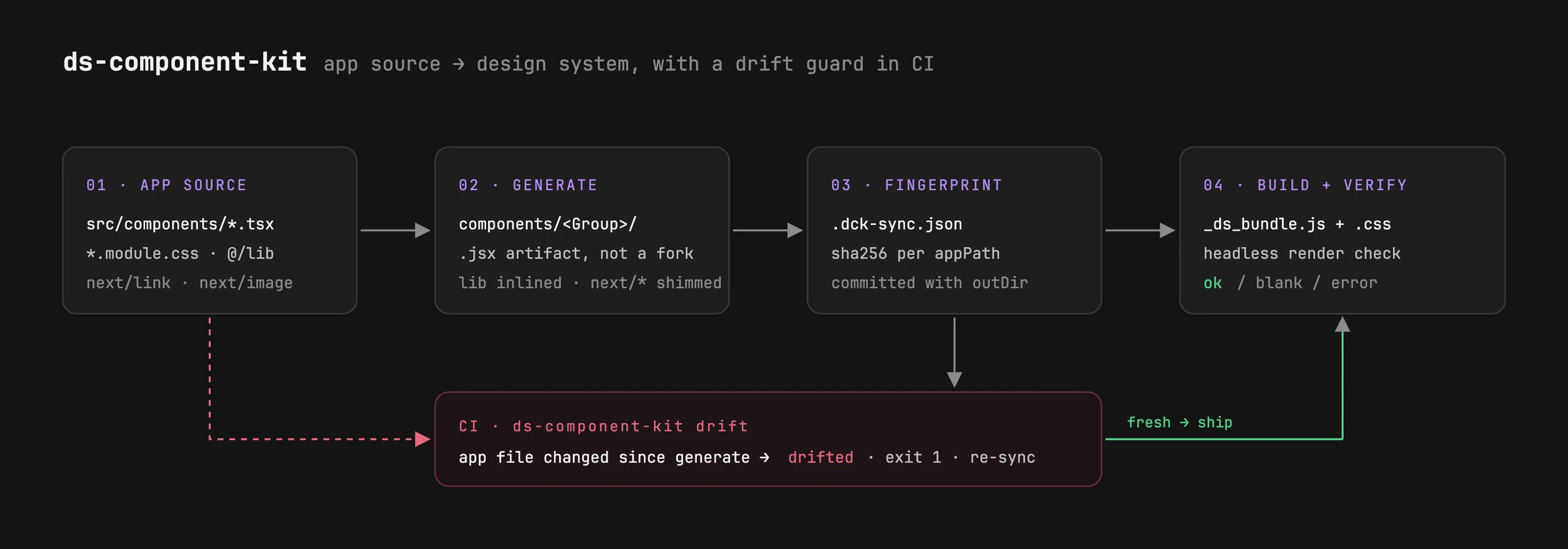
DiagramFictional dataApp source to design system, with a drift guard in CI. 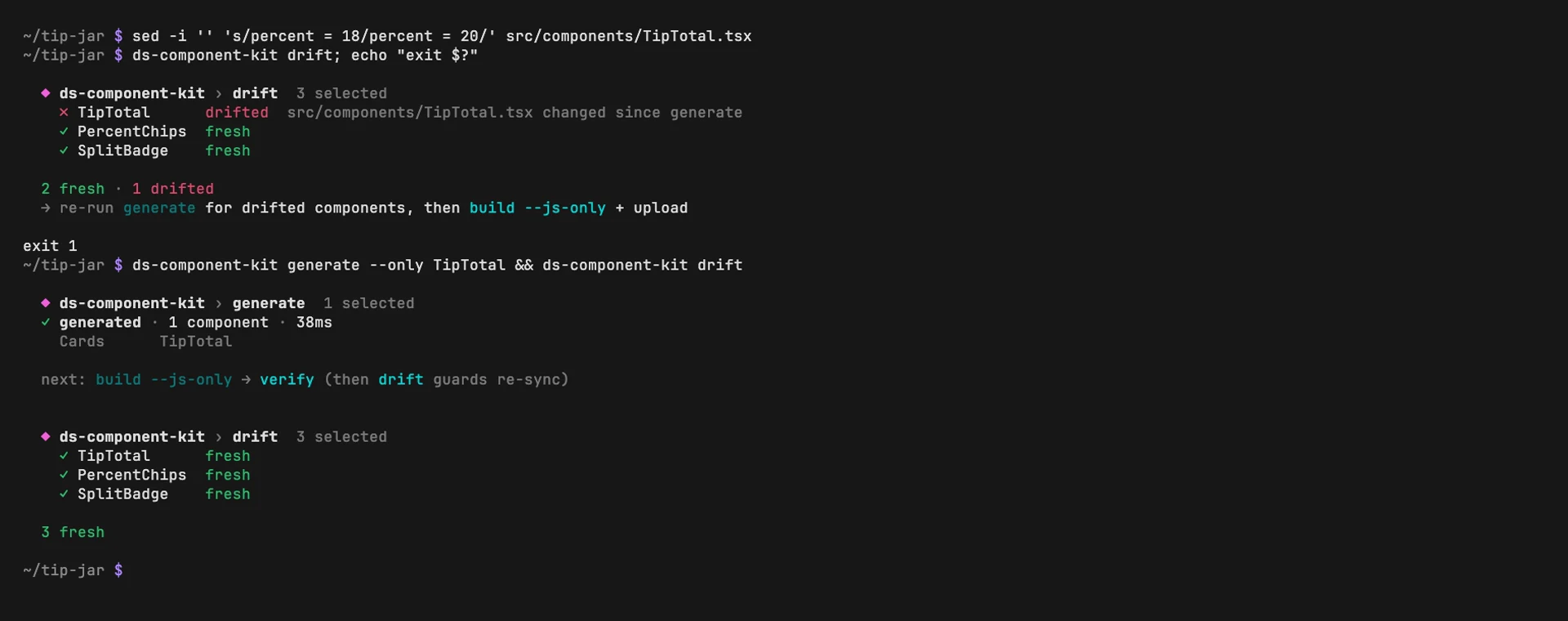
ScreenshotFictional dataThe drift check catches a changed component, then clears. 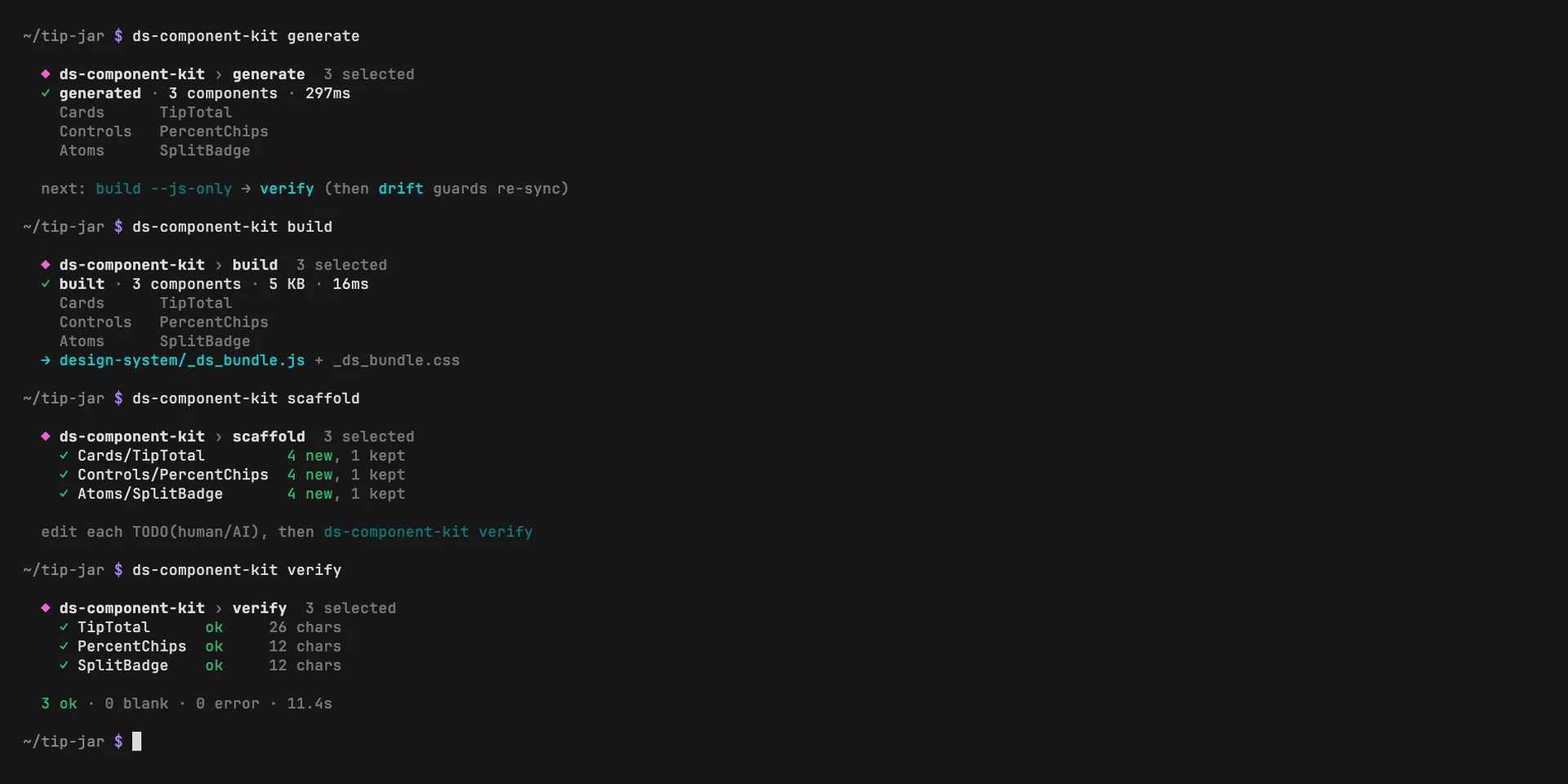
ScreenshotFictional dataGenerate, build, scaffold, verify: three components, all rendering.
How it’s built
- Node.js, as a single-file CLI with no framework
- esbuild
- Headless Chrome for verification
- Node’s built-in test runner, on Node 18, 20 and 22
DECISIONS, AND WHY
Generate, don’t copy
Components in the design system are build output, produced from the app on every sync. A copy maintained by hand is a fork, and forks drift.
Drift is a red check, not a surprise
Fingerprints of each source are committed with the system. When they no longer match, the drift command exits with an error, so silent rot becomes something a pull request has to answer.
Borrow the runtime’s React
After publishing, Claude Design’s own self-check reported a second copy of React in the bundle, which breaks hooks even though every local check passed. The bundle now uses the runtime’s React instead of shipping one.
Skip what fails, keep the rest
A component that doesn’t compile or render is set aside with a one-line reason, and the rest of the batch carries on.
Timeline
Written, built and tested over two days: the write-up, the kit, generate and drift, Tailwind support, and the lessons from the round trip.
Status
Status: Open sourceOpen tools. The workbench beneath the products, in the open.
Open source under the MIT license. It documents an approach that worked in mid-2026; Claude Design is still changing, so the token sync is the stable part and the component path is more involved.
Credits
- Written and built by one of the studio’s founders.